Reads the plan for you
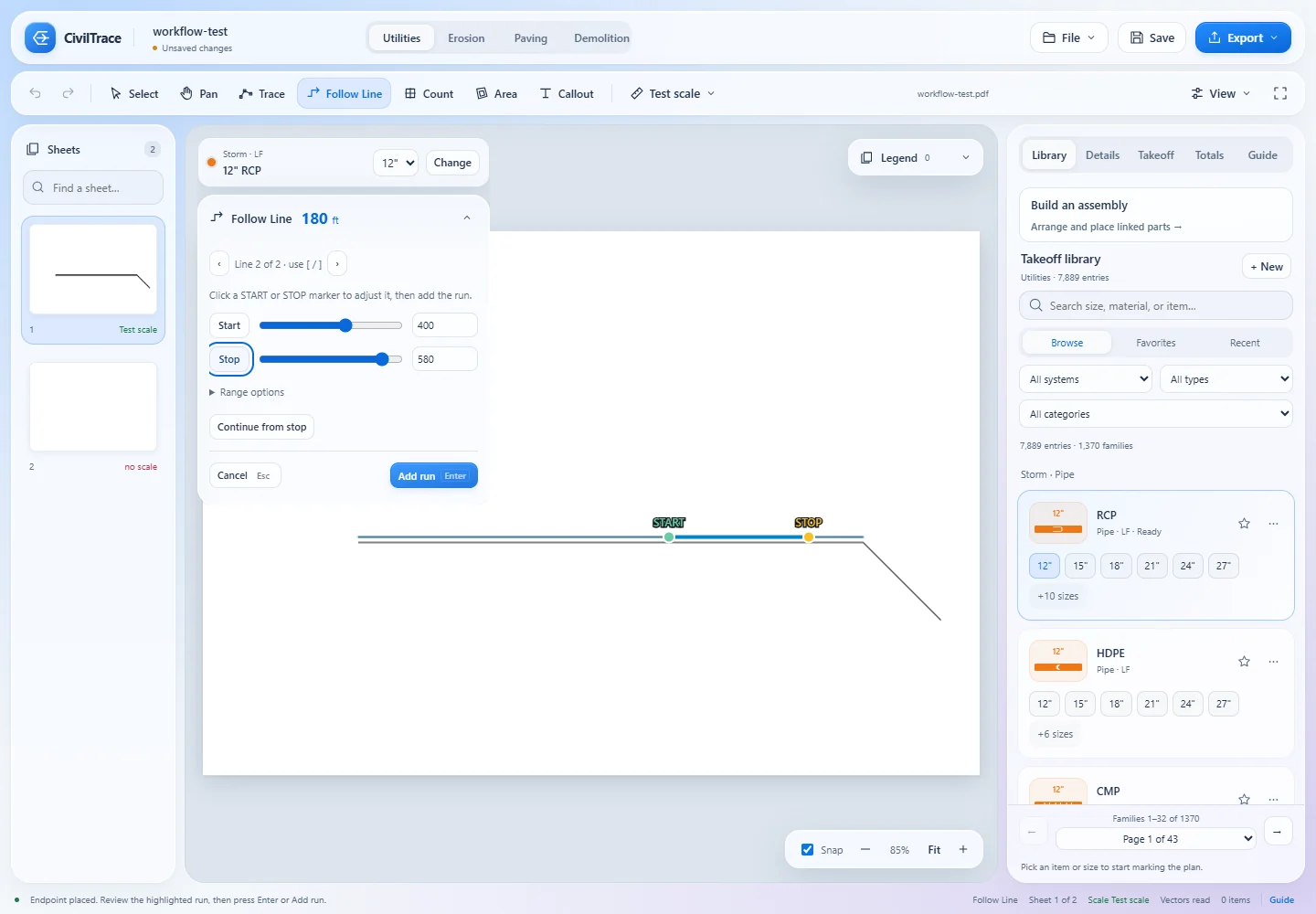
Click 300 LF - 18" RCP @ 0.40% and size, material, slope and system fill in. Inline tags, structure labels, rim and invert callouts, sheet titles and scale notes are read too, and shown to you to confirm.
Click a pipe line on a vector PDF and CivilTrace measures the whole run, reads the callout beside it, and works out trench, embedment and haul-off. Then it writes the Excel, Bluebeam and PDF files your bid needs.
Using Bluebeam? See how CivilTrace comparesWindows 10 and 11, 64-bit. macOS is planned. Your plans stay on your PC.
How a takeoff works
The same loop every day, with a keyboard shortcut for every tool.
Drag a PDF onto CivilTrace. Sheet numbers, titles and scale notes are read from the title block, and outlined text is read by built-in OCR.
Calibrate from two points a known distance apart, or pick a preset like 1" = 40', and apply it to every sheet.
Search the library for 8" pvc, hydrant or 8x6 tee. The card at the top always shows what the next click will measure.
F Follow Line for pipe, P Trace when the drawing won't cooperate, S Count for structures, A Area, T Read Callout.
The Guide lists missing scales, missing sizes and unconnected fittings. Totals shows LF, EA and SF per sheet.
One menu writes the Excel workbook, production workbook, review PDF, marked-up set, CSV, DXF or 3D view, for one scope or all five.
See it work
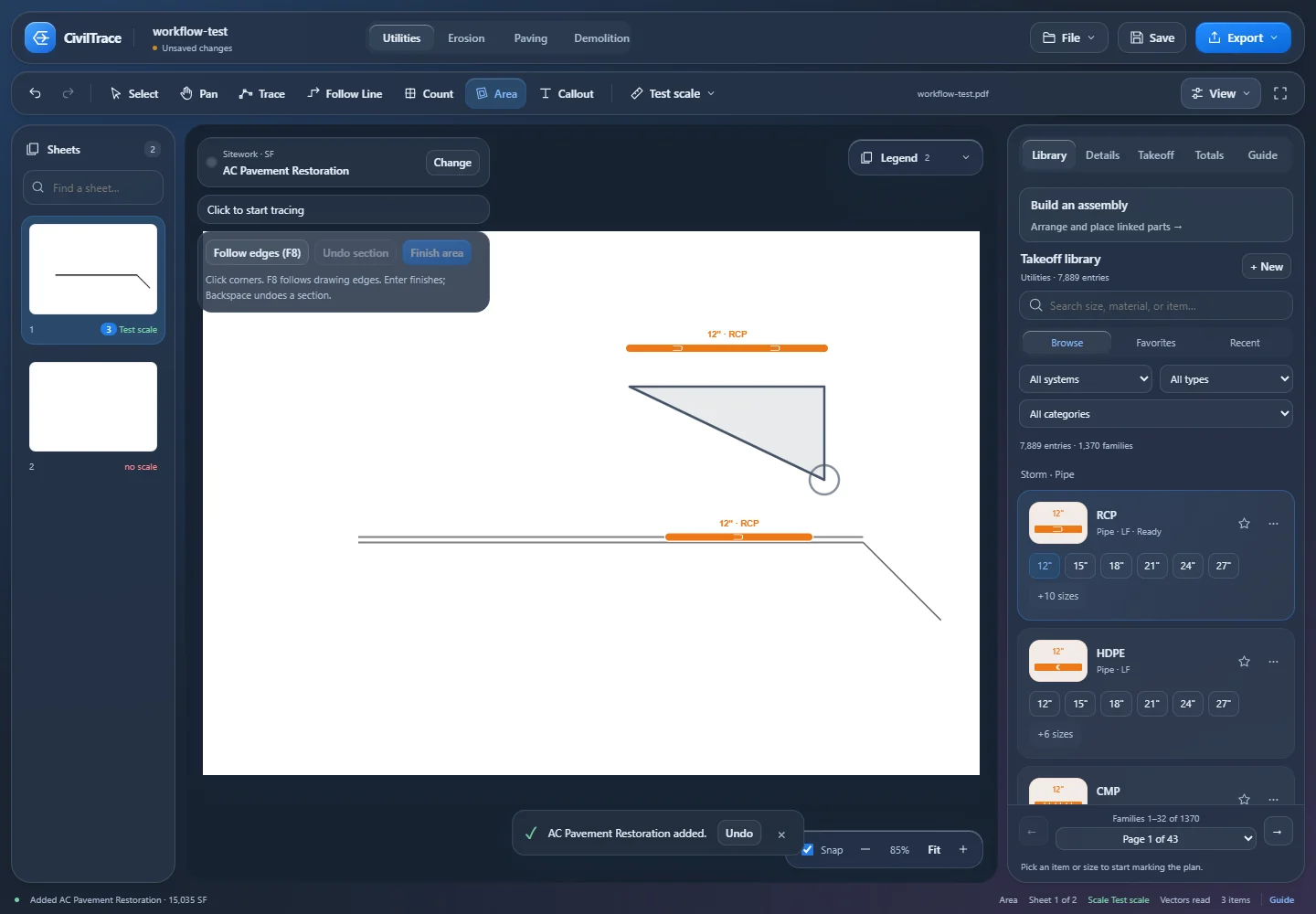
Each loop is one tool doing its job: what the estimator clicks, and what CivilTrace fills in. The tools, labels and quantities are the app's own.
What sets it apart
The defaults match how a contractor bids, not how an engineer designs.
Follow Line measures a whole pipe run from one click. Dashed CAD exports chain into one run, symbols drawn over the line are bridged, runs stop at matchlines, and profile grids are ignored so plan quantities aren't doubled. Adjust the START and STOP markers, cycle to a nearby line, or continue from the stop at a junction. See the full pipe takeoff walkthrough, from scale to trench math.
Click 300 LF - 18" RCP @ 0.40% and size, material, slope and system fill in. Inline tags, structure labels, rim and invert callouts, sheet titles and scale notes are read too, and shown to you to confirm.
9,400+ items by system, material and size. Fittings as run × run × branch (8x8x6 wye), structures, services, testing and removals. Right-click to add a size that's missing.
Import existing Revu measurements as items. Export a review PDF with selectable, unflattened markups, quantity comments and a layer per scope, so your reviewer stays in Bluebeam. How CivilTrace compares with Bluebeam for civil takeoff.
Sheets whose text was outlined in CAD are read by a bundled engine on your PC, for callouts, sheet names and scale notes.
Enter rim and invert and depth and slope calculate as you type. Wet sections are flagged against your water table, with dewatering and wet bedding created over the wet length.
Attach fittings and structures to their pipe so production sheets group them once. Build a tee, valve and reducer assembly and place it in one step.
Sheet-by-sheet review of missing scales, sizes and connections, plus quick quantity lookups answered from your own project data.
A 10-sheet set paints in about two seconds. Large sets scan in the background, and switching sheets takes well under half a second.
Light and dark themes, Ctrl+K command search, resizable panels, reduced motion, optional sounds, autosave and crash recovery.
Five scopes, one project
Each scope has its own library, shows only its own items on the sheets, and exports on its own. The SWPPP package and the utility package come out of one takeoff.
Storm, sanitary, water, fire, irrigation, reclaimed, gas, electric and telecom, plus sitework such as restoration, rock, select backfill, guardrail, fence and walls.
Pipe LF by system, material and size · fittings and structures EA · areas SF
SWPPP perimeter and flow controls, inlet protection, construction entrances, check dams, basins, washouts and stabilization, each with its own dash pattern, symbol or hatch.
LF · EA · SF
Asphalt by thickness, base and subgrade, seals, concrete flatwork, curb and gutter by profile, joints, striping, ADA and signage counts.
LF · EA · net SF with pavement sections and base CY
Clearing, pavement, pipe and structure removal, abandonment, building trades, abatement allowances and salvage, in 24 categories.
LF · EA · net SF
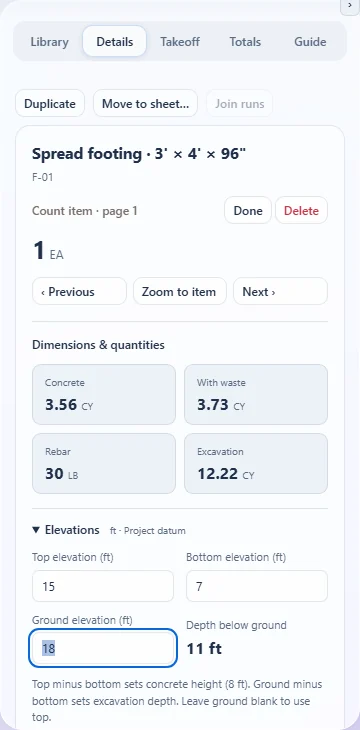
Piers and piles, footings and caps, grade beams, walls, slabs and mats, pedestals, site bases and embeds, with editable dimensions.
Concrete CY with waste · rebar LB · forms SFCA · dig, backfill and haul CY
Pipe system colours
Every pipe type has its own colour, line weight, dash pattern and tag, so a water main, a fire main and a sewer stay distinct on the plan, in the legend and in every export.
Contractor math built in
Stop re-typing quantities into production sheets. CivilTrace does the math with your own constants, and you can change any of them per run, per system or for the whole project.
Every default is editable. Set your own rates once and they travel with the project.
Exports
Every export comes from the same calculator, so Totals, the legend, the workbook, the CSV and the PDFs match. The Export menu defaults to the current scope, and Everything bundles all five.
| Export | What's in it | Opens in |
|---|---|---|
| Excel workbook | Summary by scope, embedment roll-up by system, a tab per scope, detail and pages | Excel, Google Sheets |
| Production workbook | A sheet per system with blue input cells and live formulas for days, hours, tons and loads | Excel |
| Review PDF | Original sheets with selectable, unflattened markups, quantity comments and a layer per scope | Bluebeam Revu, Acrobat |
| Marked-up plan set | Flattened takeoff on each sheet with the report appended | Any PDF viewer, print |
| PDF report | Summary and detail tables, with an optional image of every marked sheet | Any PDF viewer |
| Bid package | Workbooks, review PDF and checklist written together with bid headers | A folder |
| CSV | Summary, one row per item, or a bid-item list | Spreadsheets, estimating systems |
| DXF | Takeoff geometry in feet, one layer per system | AutoCAD, Civil 3D |
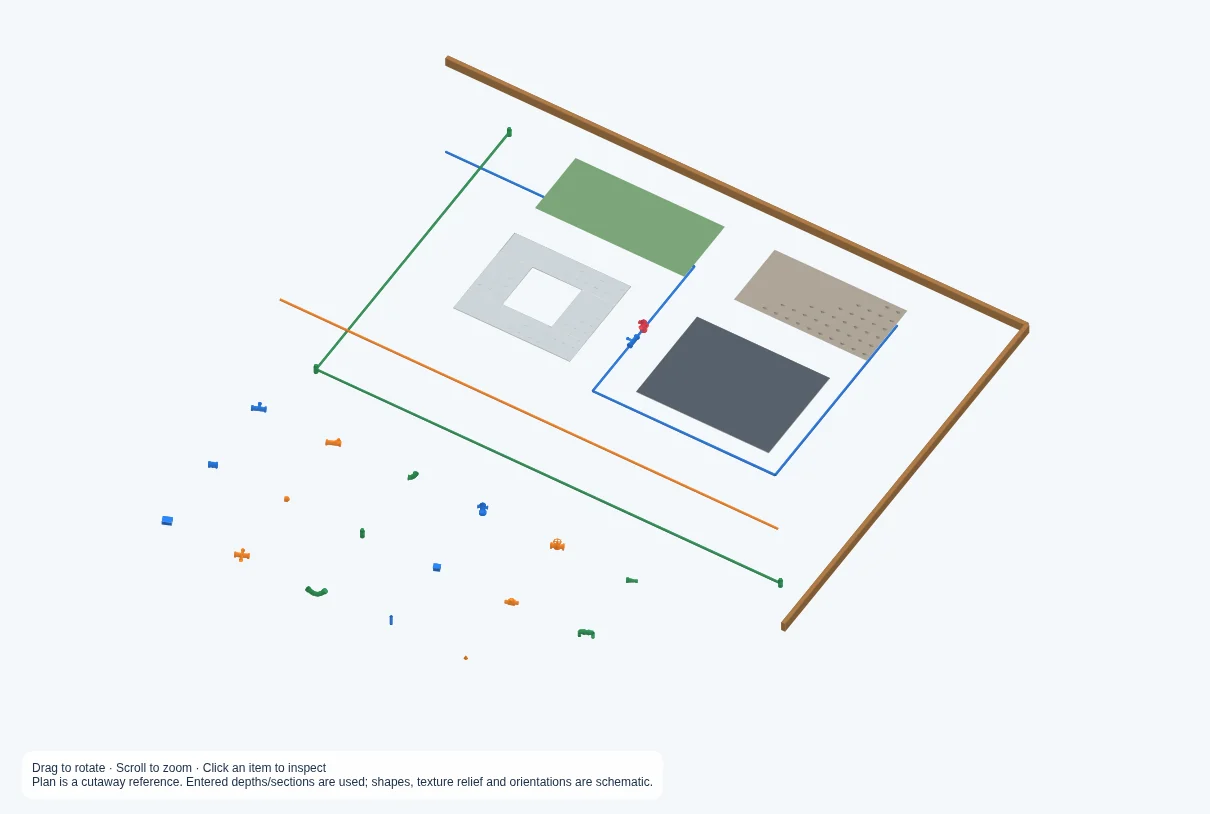
| 3D scope view | A self-contained interactive model with plan underlay, trenches and depth cutaway, plus bird's-eye PDF views | Any browser, offline |
| JSON | Complete project data | Other software |
| Clipboard | Tab-separated summary | Paste anywhere |
The Bluebeam export is a snapshot, so edits made in Revu don't sync back. There's no direct HCSS, B2W or Procore connector; the CSV bid-item list is the bridge.
3D scope view
A live 3D view of the current sheet with trenches, depth cutaways and crossings. Export it as a single HTML file anyone can open offline, or as bird's-eye PDF views for the bid.
Shapes are schematic and grade is the reference level, so use it as a scope check.
Privacy and licensing
CivilTrace is a desktop app with no cloud dependency.
Plans, projects, OCR and quantities stay on your PC. There's no analytics or telemetry code in the app. The only network calls are license activation and update checks.
One license key activates up to two computers. Activation needs internet once; after that CivilTrace runs offline for up to 14 days before it checks in again.
The app checks for updates, shows the release notes, downloads when you say so and installs on restart after the normal save prompt. Every download is checked against its SHA-512 hash.
Projects save beside the PDF as a .civiltrace file, with autosave and crash recovery on by default. Damaged project files are rejected before they can replace an open takeoff.
Pricing
Each paid license runs on two computers and works offline for up to 14 days at a time. The free trial lets you open plans, measure and save on one computer; exports and reports unlock with a plan. Prices are in US dollars.
$0 for 7 days
Open plans, measure and save on one computer. No exports or reports until you choose a plan. Your key appears right here.
$79 per month
Updates included. Cancel any time.
Choose monthlyBest value
$780 per year
Updates included. Saves $168 a year over monthly.
Choose annual$4,000 once
Own the 1.x license outright. Add $400 a year for support and updates.
Buy it oncePaid plans check out securely through HoneyBook, and your license key is emailed to you as soon as payment clears. Trial keys are issued instantly, one per email and per computer. For help, email kebraearthwork@gmail.com.

Download
Windows 10 and 11, 64-bit. One-click installer, about 160 MB. You'll need a license key to activate, so grab a free trial key first.
The download starts right away. File: CivilTrace-Setup-x64.exe. The SHA-256 checksum and release notes are on the releases page.
FAQ
Civil takeoff software measures quantities from site plans: pipe footage, fittings and structures, paving and flatwork areas, erosion control, demolition and foundation concrete. CivilTrace does this on vector PDF plan sets, so one click on a storm, sanitary or water line measures the whole run, and trench, bedding and haul quantities are worked out for the bid.
Estimators at civil, sitework, underground utility, earthwork and paving contractors, and anyone bidding SWPPP, demolition or site concrete packages from PDF plans. It was built by an earthwork contractor for its own estimating team.
Not yet. CivilTrace runs on Windows 10 and 11, 64-bit. A macOS version is planned.
CivilTrace is built for vector PDF plan sets, the kind exported from CAD. Follow Line, edge-following and Find like this need that line work. Scanned or rasterized sheets still open, and you can measure them with manual Trace, without snapping.
No. Depths come from rim and invert callouts or from what you enter, and CivilTrace calculates depth and slope as you type.
No. CivilTrace reads the line work and text already in your PDF and suggests sizes, types and labels for you to confirm. Nothing is sent to an outside service.
Not for the takeoff. If your reviewers work in Bluebeam, CivilTrace imports Revu measurements and exports a review PDF with selectable markups and a layer per scope. That export is a snapshot; changes made in Revu don't sync back. Read the full comparison: CivilTrace vs Bluebeam for civil takeoff.
Yes. Trench widths, bedding material, tons per CY, waste, swell, truck size, water table depth and production rates are all editable defaults, per run, per system or project-wide.
Two computers per license. Floating or concurrent seats aren't offered.
Yes, after activation. CivilTrace runs offline for up to 14 days between check-ins.
There's no direct connector. CivilTrace exports CSV (including a bid-item list), Excel and JSON, which most estimating systems can import.
Support and updates for that year.
Enter your email in the Free trial card under Pricing and your 7-day key appears right away. Download the installer, paste the key on the activation screen, and start your takeoff. The trial is for measuring and viewing: exports, reports and copying tables out are unlocked by a paid plan. One trial per email and per computer.
Email kebraearthwork@gmail.com. The activation window has a Copy support details button that leaves out your license key and project paths, so you can paste it straight into the email.